Purchase returns
A purchase return is how you send goods back to a supplier — because they sent the wrong item, the goods were damaged, or stock has expired. It takes those items out of your stock and reduces the amount you owe the supplier.
Overview
A purchase return is the mirror image of receiving a purchase. Where receiving adds stock and increases what you owe, a return removes the goods from stock and reduces what you owe. Because it lowers your bill, this kind of document is often called a debit note — you're effectively telling the supplier "you owe me less now."
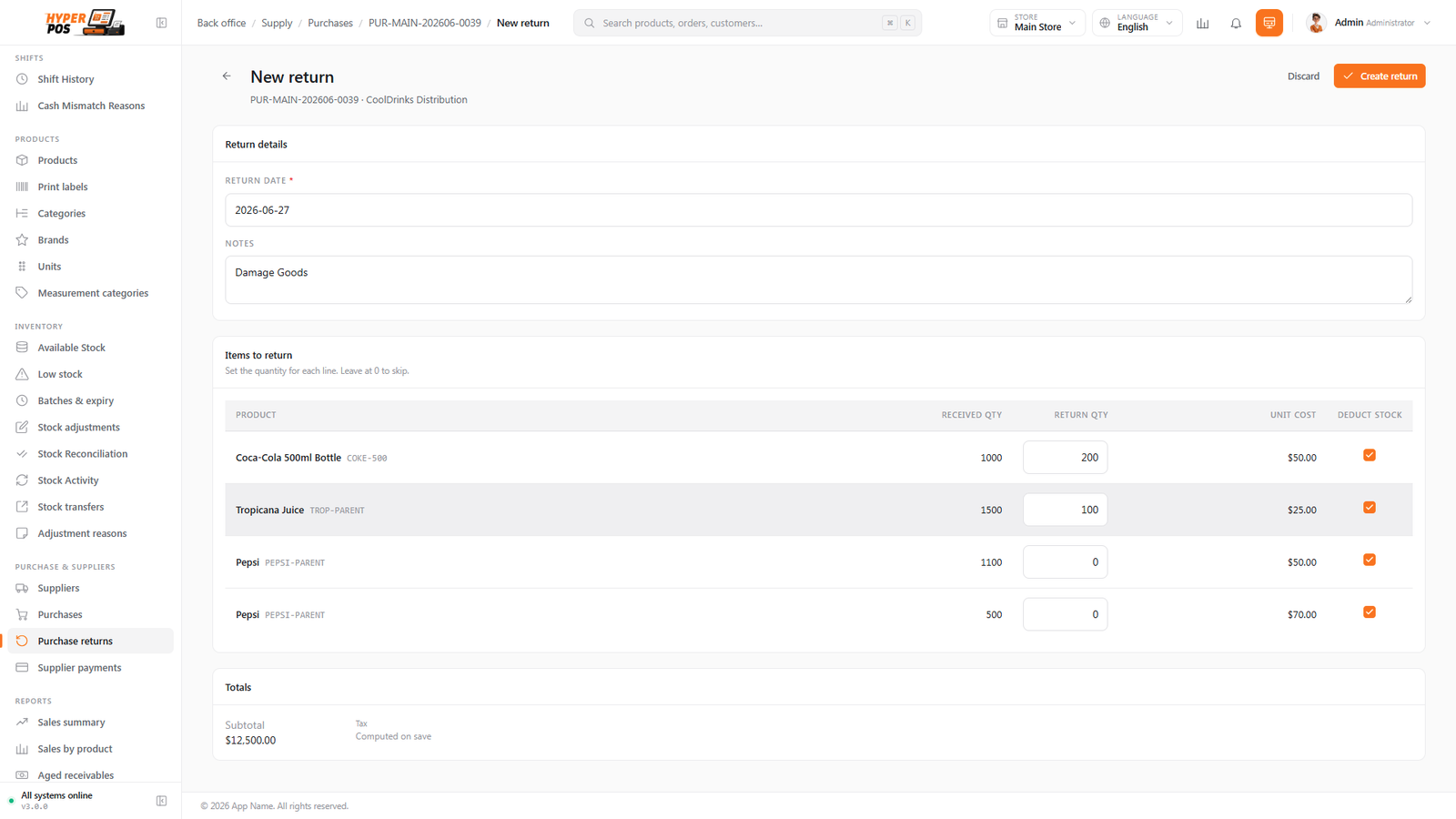
You usually start a return from the original purchase, so the app knows exactly which items and prices to reverse.
Why it's useful
- Your stock stays correct. Items you've sent back leave your stock automatically, so you never count goods you no longer hold.
- Your supplier balance stays correct. The value of the returned goods comes off what you owe — no manual adjustment needed.
- You keep a record. Every return is saved with its reason, so disputes and credit notes are easy to trace later.
- It handles the awkward cases. Wrong, damaged or expired stock all have a clean, paper-trailed way out.
How to return goods, step by step
-
Open the original purchase
Go to Purchases and open the purchase the goods came in on. (You can also open the supplier and find it there.)
-
Start a return
Choose Create return. The lines from that purchase appear, ready for you to pick from.
-
Choose what's going back
Tick the lines you're returning and set the quantity for each. You don't have to return a whole line — return only the faulty units if you like.
-
Give a reason
Pick a reason — wrong product, damaged, expired, and so on. A reason is required, because it's what makes the return easy to understand later.
-
Choose how the value comes back
Decide whether the supplier reduces your balance (a credit — the most common choice) or actually pays you cash back. Pick whichever matches your arrangement.
-
Confirm
Save the return. The goods leave your stock, your supplier balance drops by the returned value, and the return is recorded with its own number.
If a complete delivery was wrong, there's a shortcut to return every line at full quantity in one go, rather than ticking each line by hand.
Tips & best practices
- Always pick the matching purchase. Starting the return from the original purchase keeps the quantities and costs accurate.
- Choose the right value option. If the supplier simply knocks it off your next bill, that's a credit; only pick cash back if they actually hand money over.
- Use clear reasons. "Expired" or "Damaged in transit" makes future reconciliation and supplier conversations much easier.
Notes & warnings
A return reduces your stock. Only return units you're physically sending back, so the count on the shelf matches the count in the system.
A return is the right tool for undoing a received purchase. If you booked in goods you shouldn't have, return them rather than trying to delete the purchase.
Related: Purchases · Suppliers · Supplier payments