Shifts & cash drawer
A shift is one cashier's session at the till, from when they count the drawer at the start to when they count it again at the end. It's the simple discipline that keeps your cash honest: open with a count, sell, close with a count, and see if the drawer matches.
Overview
Every cash drawer goes through the same rhythm. At the start of the day (or your turn), you open a shift and count the cash already in the till — the opening float. You then sell all session. At the end, you close the shift by counting the drawer again. The system compares what should be there against what you actually counted, and flags any difference.
This is standard retail practice, and it answers the most important end-of-day question: does the cash add up?
Why shifts matter
- Accountability for cash. Each shift is tied to one cashier, so if the drawer is short, you know whose session it happened in.
- A clean end-of-day total. The closing report shows sales, payment types and taxes for that session in one place.
- Early warning. A mid-shift snapshot lets a cashier check the drawer before problems pile up.
- An honest paper trail. Every open, close and mismatch is recorded — useful for owners running more than one branch.
Opening a shift
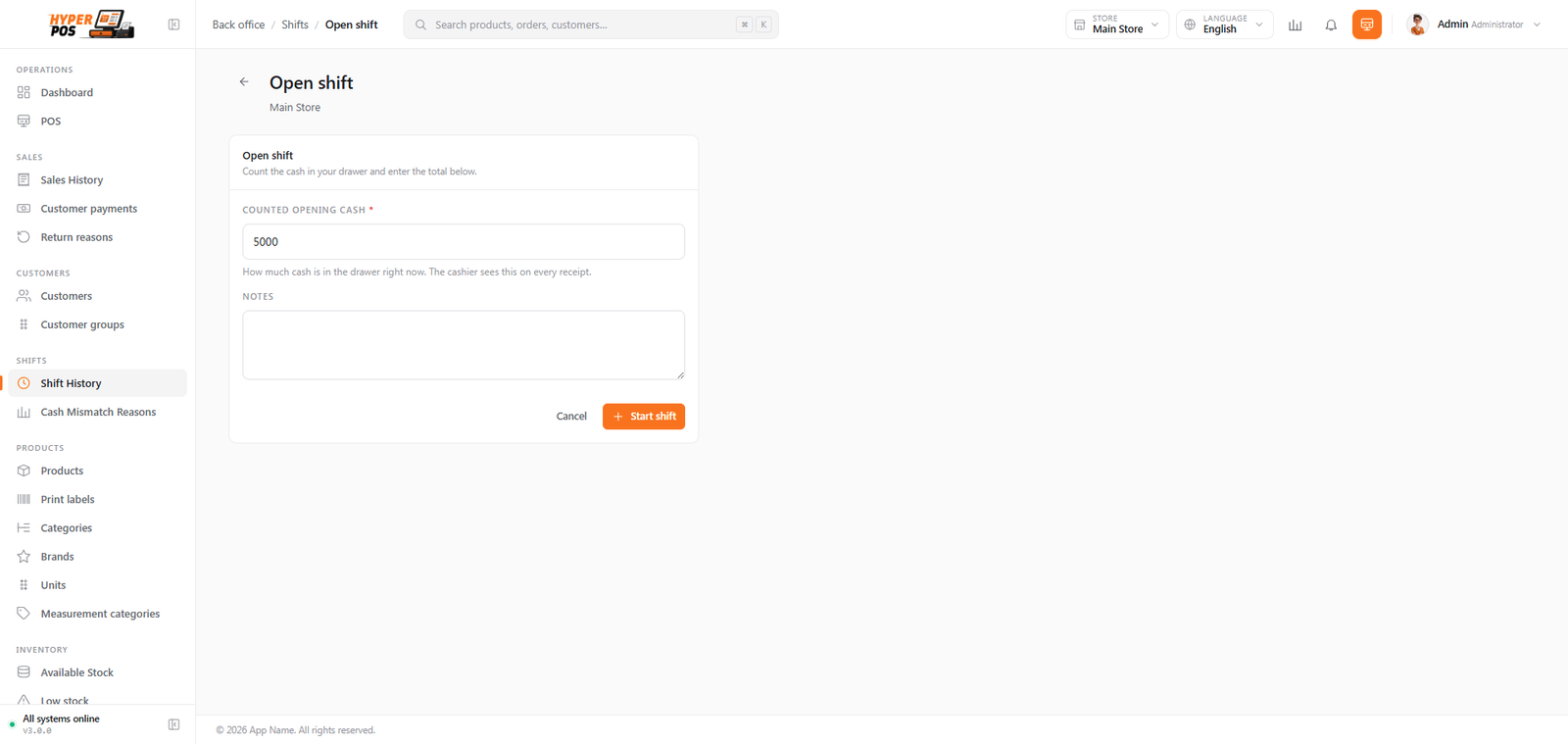
If your store requires shifts, the POS screen won't let you sell until one is open — it shows the open-shift form first.
-
Count the drawer
Physically count the cash already in the till before you start. This is your opening float — the change you'll need to give early customers.
-
Enter the opening cash
Type the counted amount into the opening-cash field. A denomination helper can add it up for you: enter how many of each note and coin you have, and it totals them.
-
Start the shift
Click Start shift. You're taken to the POS screen, ready to sell. Every sale you make is now tied to this shift.
If you leave a steady amount of change in the drawer overnight, a shortcut fills the opening cash from the previous shift's closing count — so you don't recount from scratch.
Closing a shift
At the end of your session, you close the shift by counting the drawer one last time.
-
Start the close
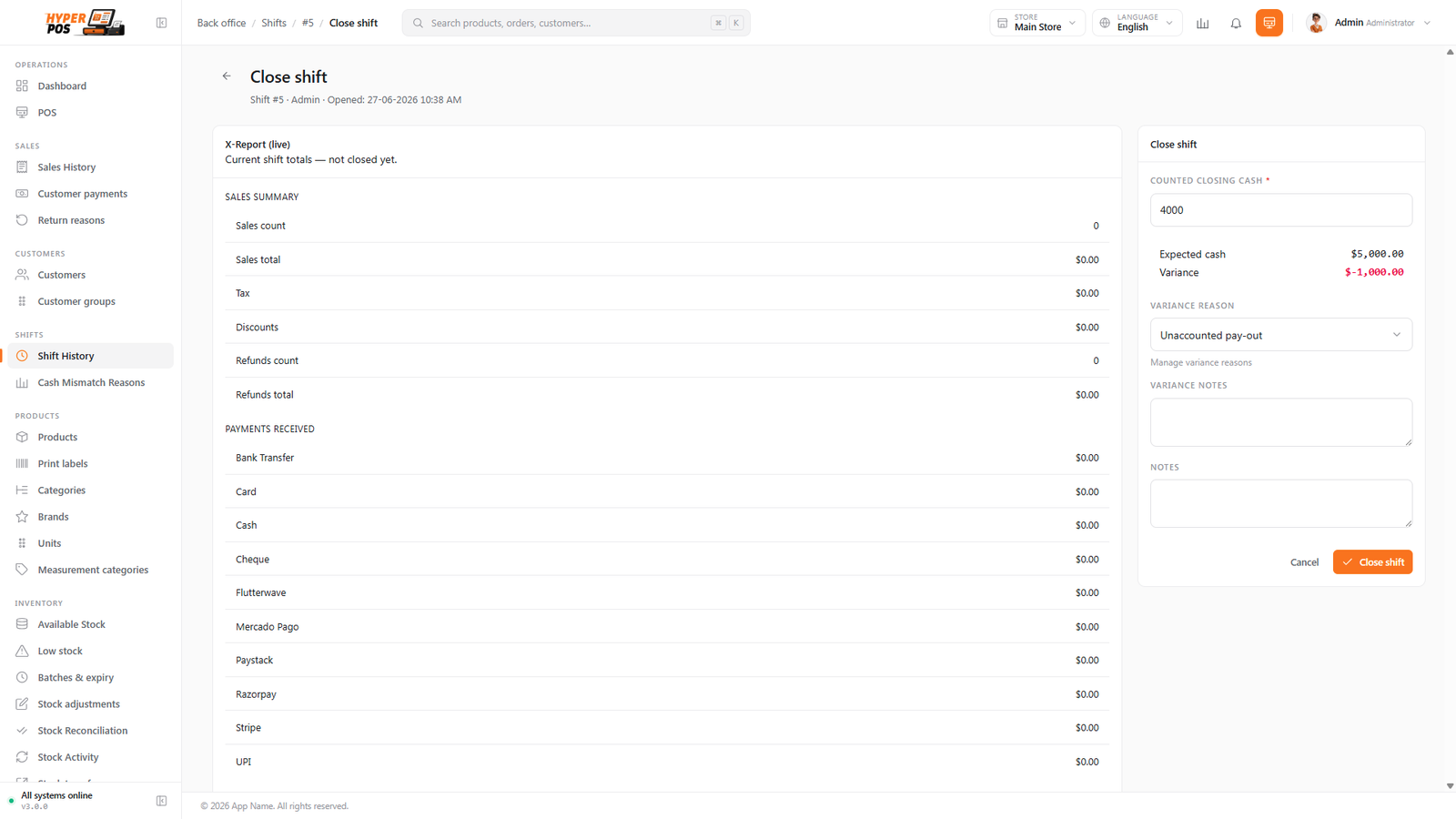
Choose Close shift. A summary appears showing the sales and payments taken so far this session.
-
Count and enter the closing cash
Count all the cash in the drawer and enter it. The denomination helper is here too. As you type, the screen shows the variance live (explained below).
-
Explain any mismatch
If the count is off by more than your store's allowed tolerance, you'll be asked to pick a mismatch reason and add a note.
-
Close & print the Z report
Confirm to close. The shift is finalized and its Z report — the end-of-shift summary — is produced for you to print or file.
X report vs Z report
Both reports show the same kind of summary — sales, payment types, taxes and the cash position — but they're used at different moments:
| Report | When | What it does |
|---|---|---|
| X report Interim | Any time during an open shift | A read-only snapshot of how the shift is going so far. It does not close the shift, and you can run it as many times as you like — handy for a mid-day check or a handover between cashiers. |
| Z report Final | Produced when you close the shift | The official end-of-shift document. It locks in the totals and the final cash count, and is the one you keep for your records. |
A simple way to remember it: X is a peek, Z is the close.
Cash variance (over or short)
When you close, the system works out how much cash should be in the drawer — your opening float, plus cash sales, minus cash refunds, plus or minus any cash added or removed during the shift. It then compares that expected amount to what you actually counted. The difference is the variance:
| Result | Meaning |
|---|---|
| Counted = Expected | The drawer balances perfectly. Nothing to explain. |
| Counted > Expected | Over — there's more cash than there should be (often a miscounted change given to a customer). |
| Counted < Expected | Short — there's less cash than there should be. |
Small differences are normal and expected. Your store sets a tolerance (for example, a few units either way). If the variance is within tolerance, the shift closes as Closed. If it's outside tolerance, you must choose a mismatch reason — such as a miscount, a change dispute, or an unrecorded cash movement — and the shift closes as Closed with variance, with a note for the record. Managers can review the standard mismatch reasons under Shifts → Cash Mismatch Reasons.
Putting cash in and taking cash out
Cash moves in and out of a drawer for reasons that aren't sales: the manager tops up the float, someone is sent out for stationery, the day's takings go to the bank or the safe. Record each of those and your expected cash stays honest — miss them and you'll close short (or over) for no good reason.
Every shift has a Cash drawer panel with three things you can record:
| Movement | When you use it |
|---|---|
| Pay-in (cash in) | Cash is being added — a float top-up, a manager refill from the safe. |
| Pay-out (cash out) | Cash is being removed — petty spending, a bank deposit, moving takings to the safe. |
| No-sale drawer open | The drawer was opened without a sale — usually to give a customer change. No money moves; it's logged for the record. |
Doing it without leaving the cashier screen
You don't have to go to the back office. On the POS screen, open the overflow menu (the ⋮ button) and choose Cash in / out. The same movement is recorded against your open shift, and you're back at the cart in seconds. It's the same panel, just where the cash actually is.
Saying what a pay-out is for
When you take cash out, POS asks "What is this for?". Your answer decides whether the money is simply gone from the drawer, or gone from the business:
| Choice | What happens |
|---|---|
| Expense (petty cash) | The drawer goes down and an expense record is created for you — so the spend shows in Expenses and on your profit & loss, not just in the till. Pick an expense category and add a bill reference if you have one. |
| Bank deposit | The drawer goes down. The money hasn't been spent — it's moved — so no expense is created. |
| Moved to safe | Same: the drawer goes down, nothing is spent. |
| Other | The drawer goes down and nothing else is recorded. Use the reason field to explain. |
A pay-out can never be more than the drawer holds — POS shows the cash available and tells you the maximum you can take. If you're emptying the drawer, Take all fills the amount for you.
It works in the other direction too: if you record a cash expense in the back office while you have a shift open, POS creates the matching pay-out for you, so the drawer and the books agree without anyone typing it twice. See Cash expenses and the drawer.
Petty cash, done properly. Choosing Expense on a pay-out means the money someone spent on bin bags is a real expense in your books — categorised, on the P&L, and visible in reports — instead of an unexplained shortage at closing time.
Paying a supplier from the till
Sometimes a supplier's delivery driver waits at the counter to be paid in cash. Instead of leaving the till to record it later, you can pay them straight from the open shift. On the shift's Cash drawer panel you'll find a Pay supplier tab that opens the same supplier payment form used in the back office — pick the supplier, and settle their unpaid purchase invoices in full or in part.
-
Open the Pay supplier tab
With a shift open, go to the Cash drawer panel and choose Pay supplier. This tab only appears if your role has the supplier-payment permission, so not every cashier will see it.
-
Record the payment
Pick the supplier and choose which unpaid invoices the money settles — the whole balance or a partial amount. The form is scoped to this shift's store, so you're paying from the right till.
-
Confirm
Save the payment. If you paid by cash, the amount is taken out of the drawer as a pay-out automatically, so your expected cash drops by that amount. Paying by any other method (bank, cheque, UPI) records the payment but leaves the drawer untouched.
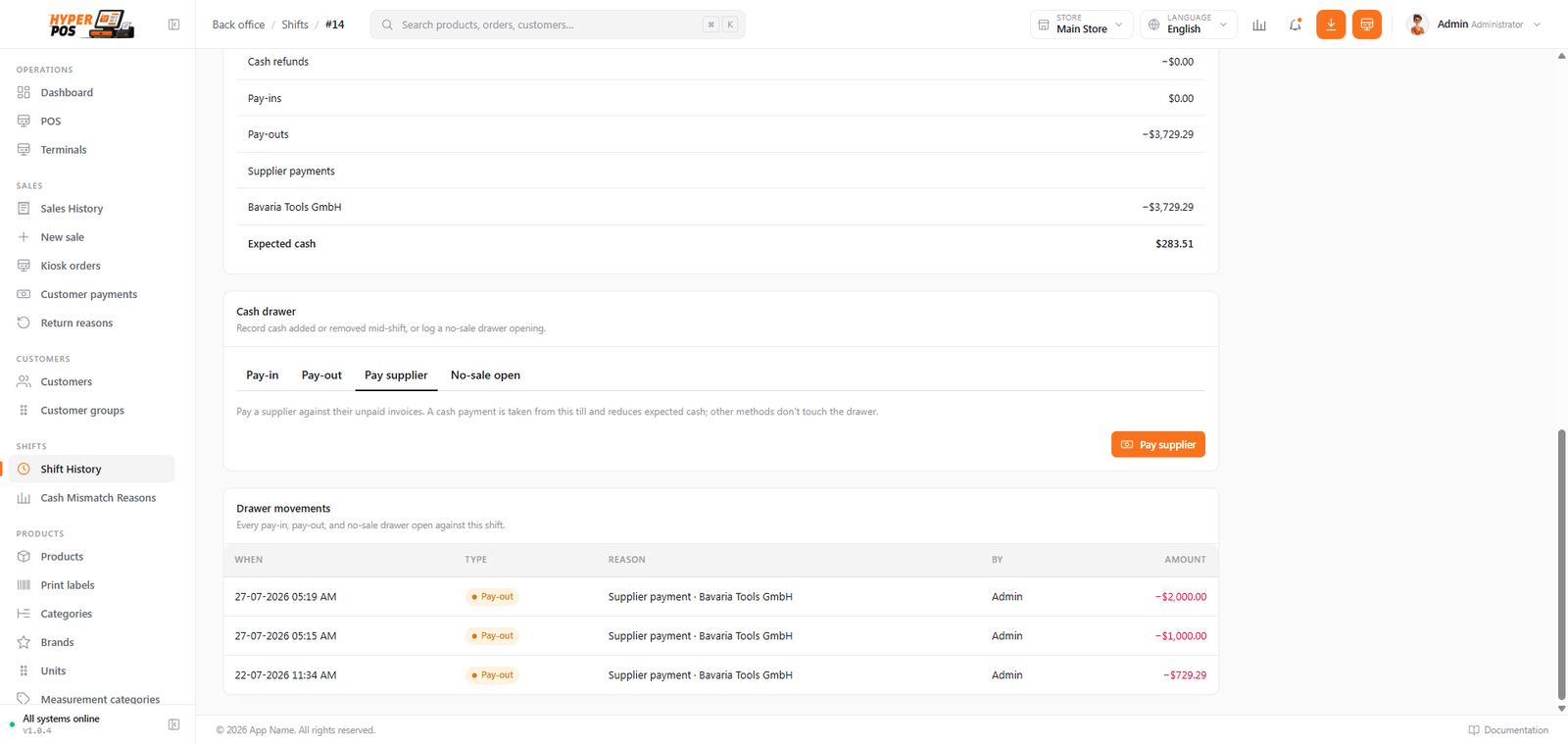
A cash supplier payment reduces the drawer's expected cash and appears on the shift's X and Z report as a pay-out, so your closing count should be lower by that amount. That's expected — don't treat it as a shortage. If you later void the payment, the cash is returned to the drawer as a matching pay-in and the expected figure goes back up. This is distinct from an expense: use this to settle a supplier's purchase invoice, and record other cash spending as an expense.
Tips & best practices
- Count carefully, twice. Most variances are simple miscounts. Use the denomination helper to avoid mistakes.
- Run an X report mid-shift on a busy day to confirm the drawer is on track before it's too late to spot a problem.
- Be honest about the cash you take. Type the real amount a customer hands you at the counter, so the expected-cash figure stays correct.
- Write a clear mismatch reason. "Gave wrong change at lunch" is far more useful later than a blank note.
Notes & warnings
A closed shift can't be reopened. Closing is final. Make sure your count is right before you confirm.
Voids only work while the shift is open. If you need to reverse a sale, do it before closing — once the shift is closed, its sales can no longer be voided. See Sales history.
Don't skip the count to save time. A guessed closing figure defeats the whole point of a shift. The few minutes it takes to count the drawer is what protects you from losses going unnoticed.
Related: The POS screen · Sales history · Reports